I built a Recorder Visualizer because I couldn't learn the recorder
Apr 5, 2026 (updated: 1 week ago)
The story
I started with a bamboo flute. I could not blow a single note. Not one. So I switched to the recorder - people say you don't really need mouth technique for it - but it didn't go well either. I couldn't remember the fingering patterns, and honestly the sound just didn't satisfy me. So I moved to piano instead.
Piano stuck. And what made it stick was Synthesia. As a complete beginner, I could just open it and start playing without knowing what a C was. No theory, no sheet music, just colored bars falling from the sky telling me where to put my fingers. Over the years I actually learned music theory and got into music production, but Synthesia was the gateway.
Fast forward a few years and I wanted to come back to the recorder. Older, wiser, with more patience for fingering charts. But I wanted a Synthesia for it - something that shows you the fingering diagram in real time as the song plays so you can just follow along. So I built one. In GameMaker Studio. Which was, in retrospect, a terrible idea - I couldn't edit audio samples at all, hit a wall, and dropped the project.
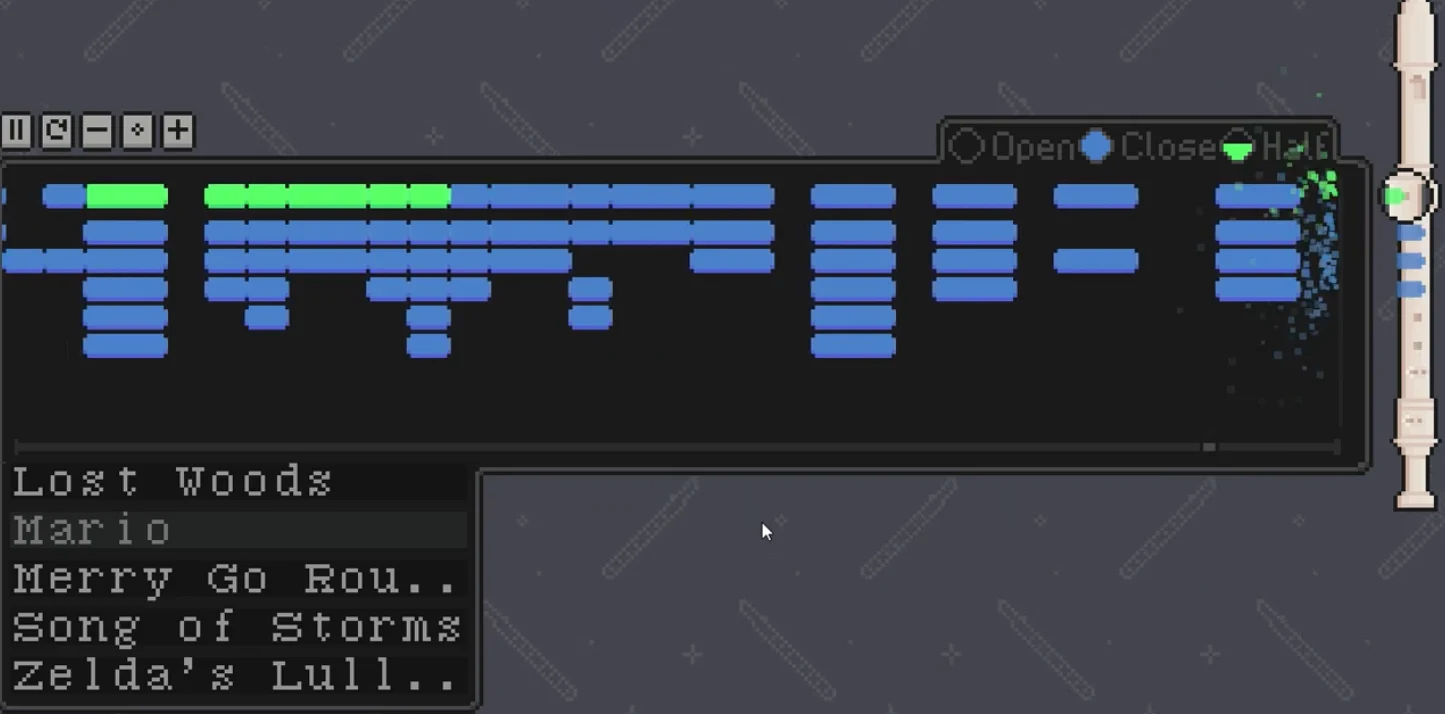
A few weeks ago I picked it back up and moved it to the web, which is just the most accessible platform there is. I had played Isle of Tune back in the day and always wondered how browser audio could sound that good, so I did some research and found Tone.js. For rendering I knew p5.js but Pixi.js felt more modern and better suited for this kind of scrolling timeline. For the frontend framework I was genuinely considering Svelte 5 - it's excellent for performance-sensitive stuff - but I spun an actual wheel. I got React. So I used React.
React for the frontend. Tone.js for audio. Pixi.js for rendering. That's the stack. Now let me talk about the actual hard parts.
Challenges
The visualization
The note timeline is the core of the whole thing - if it lags or stutters, the app is useless. Here's how I got there.
TL;DR: I went from "just move the whole container" to visibility toggling to binary search, then remembered I had already solved this two years ago in GameMaker with a boundary-walking trick that makes the per-frame cost essentially .
My first idea was simple: put all the notes in a Pixi container and just slide the container. Easy. Pixi doesn't automatically skip objects that are offscreen though, so I added a per-frame check to toggle visibility on notes that weren't in view. This worked fine for short songs.

Then I started adding effects - double rounded rectangles to fake a drop shadow, glow filters, hover states. Each note became heavier, and traversing the whole list every frame started showing its cost. Long songs lagged badly.

I switched to binary search to find which notes crossed the visibility boundary each frame instead of scanning everything. Better. But then I remembered: I had already solved this problem in GameMaker two years ago and just forgot about it. The insight is that the visible notes are always a contiguous slice of a sorted array. You don't need to search - you just walk the two boundary edges, one step at a time. Each frame, roughly one note crosses each edge during normal playback. The per-frame cost goes from to with binary search, and then down to just with boundary walking - where is usually or .
why this works - the viewport is a sliding window over a sorted array. the left and right edges are just two pointers. each frame you nudge them forward (or not). no search needed because you never "lose" where the boundary is.

(yes this diagram is bad. the green box is "notes about to become visible", the red box is the viewport. the dotted ones are hidden. the edges just... walk.)
For guide lines (bar lines, beat lines) this works perfectly: they're cheap objects, keep them all in memory, just toggle visibility at the edges. For note sprites it's a different story - each one carries a glow filter, event listeners, a fingering diagram, the works. For those I went further: don't pre-build them at all. Allocate a sprite when a note enters a buffered zone ahead of the viewport, destroy it when it exits behind. Memory stays bounded by how many notes fit on screen, not by how long the song is.
TL;DR2 on memory - instead of pre-building all sprites:
note enters buffer zone → allocate sprite
note exits behind viewport → destroy sprite
sprites alive at any time ≈ notes visible on screen
memory is , not .
The samples
The app plays real audio - sampled recordings, pitched up or down to hit the target note. Before anything makes a sound, you need a folder of files, one per note, with an index mapping note names to filenames. There are two ways to build that, and I've done both.
TL;DR: the download route gives you real recordings but they arrive broken in several ways at once. The DAW route starts clean but you're trading realism for a plugin.
Download route - find an existing library. Philharmonia has a free orchestral one; that's what the recorder uses. The catch is that real recordings arrive messy in basically every dimension at once.
Volume first. Different register, different recording session, wildly different levels. Some recorder notes were blowing my ears out; the low end was barely audible. A normalization pass over the whole folder - measuring true-peak and re-encoding anything over the threshold - brings everything to a consistent -20 dBFS. Solving it at the source is just cleaner than fighting it with gain adjustments at playback.
Duration next, and this one took the most work. Flute samples are short because players have to breathe. A held note in a song might need three or four seconds; the raw sample ends at 0.8. The fix is about a thousand lines of FFmpeg, heavily AI-assisted: find the stable sustain body of each sample, locate a loop point at a phase-matched zero-crossing so there's no click or timbre shift at the seam, stitch copies of that body with equal-power crossfades until you hit the target length, then fade the tail out gently. It works well enough. Some transitions still have a faint volume bump where different dynamic layers - recorded at different intensities - blend awkwardly. That one is genuinely hard. But at least nothing cuts off mid-phrase anymore.
Then the smaller things: the archive's folder structure needs sorting, duplicate takes get discarded, and onset positions need trimming. Every sample has a different amount of leading silence before the note actually starts, and if you don't align them the attack timing feels uneven across the keyboard.
Each step exists because something audibly broke without it.
DAW route - if the instrument lives as a plugin in your DAW, you can skip most of that. A script generates a MIDI template: every note you want to record, laid out at even intervals across the keyboard, with slots wide enough that each release tail fully decays before the next note starts. Import that into FL Studio, load the instrument, render the whole thing to a single WAV. A second script reads the WAV, cuts at the known time positions - same BPM and grid as the generator - converts each slice to MP3, and writes the index. Volume is consistent because it all came from the same engine. Duration is whatever slot width you chose. The only thing to verify is that no note bleeds into the next slot. That's how the guitar pack was made.
The tradeoff is realism. A recorded Philharmonia flute is a recorded Philharmonia flute. A plugin rendering is not. Both end up in the same sampler format - the app doesn't know or care which path you used.
Play mode
The whole point of Synthesia is that the song waits for you. You can't skip a note - it sits there until you play the right one. I wanted that. There are two input sources: a MIDI controller, which is trivial (note-on events come in and that's that), and the microphone, which is where every interesting problem lives.
TL;DR: frame-by-frame pitch tracking keeps misfiring on sustained notes. Energy-rise onset detection - watching for a spike in signal energy rather than a pitch change - fires exactly once per physical attack, handles consecutive identical notes without any external reset, and is the insight that makes the rest of it possible.
The naive approach is to run a pitch detector on every audio frame and fire a note event whenever the result changes. This falls apart on sustained notes immediately: a song with "C4 C4" in it gets both accepted from a single breath because you hold the note and the detector keeps returning the same MIDI number every frame - there's nothing to distinguish "still playing C4" from "just attacked C4 again".
The fix is onset detection. Instead of asking what pitch is playing every frame, ask did a new note just start. Two exponential moving averages track signal energy: a slow one that follows the background level, a fast one that reacts to the current frame. When the fast/slow ratio crosses a threshold - that's an attack. Fire once, lock the note, don't fire again until either silence resets the state or a genuinely different pitch takes over. Holding a note never double-fires. Re-attacking the same pitch after silence fires again, because silence reset the lock. The "C4 C4" case works correctly because each physical press produces its own energy spike.
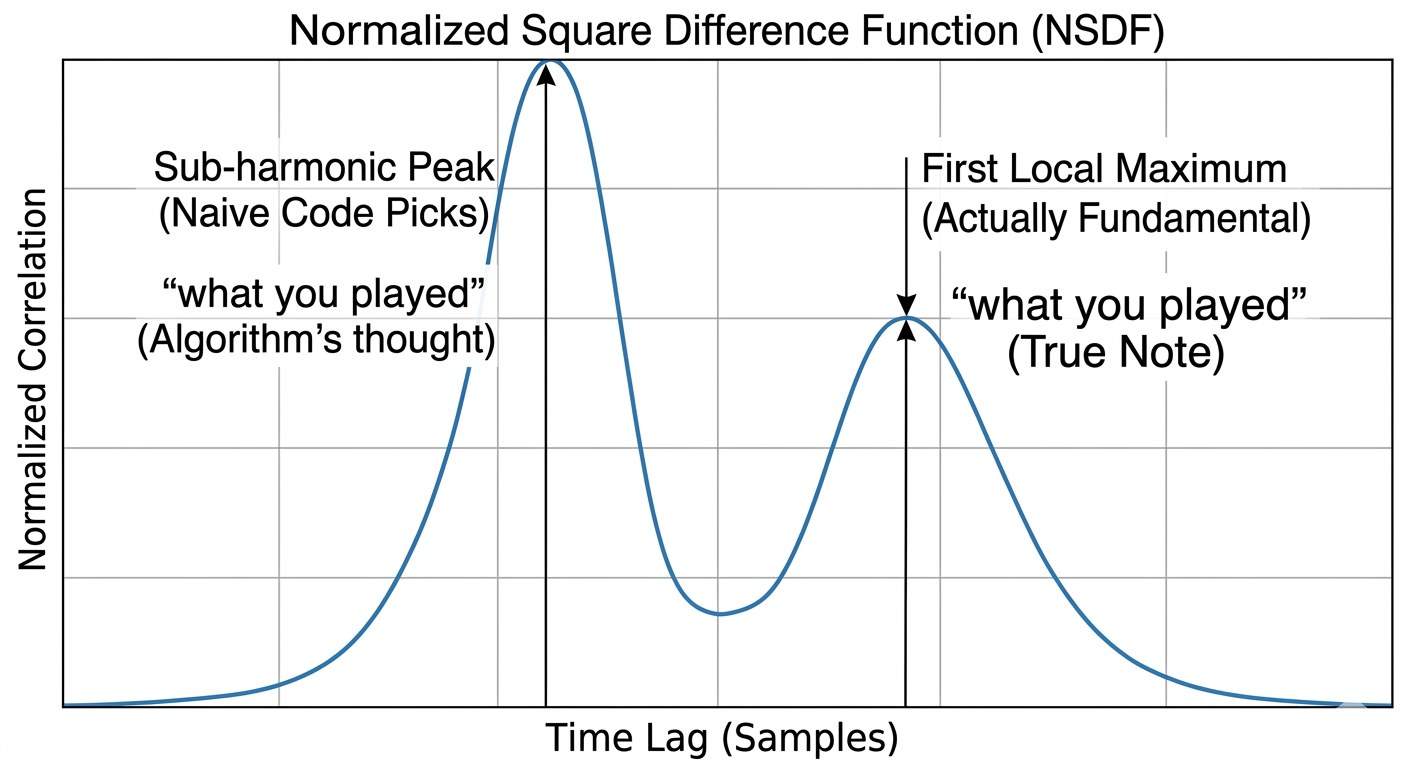
Then there's the question of which pitch was played. The detector is NSDF - Normalized Square Difference Function - which finds the lag at which the waveform most closely correlates with a delayed copy of itself. That lag is the fundamental period. The obvious implementation takes the global maximum of the NSDF curve, which is subtly wrong: in a harmonic-rich signal, a sub-harmonic at double or triple the real period can score higher than the fundamental. Playing G5 comes back as G4 half the time. The fix is to take the first local maximum above a threshold - a fraction of the global peak - rather than the global one. Smallest lag = highest frequency = the fundamental. Parabolic interpolation on the winning peak gives sub-sample accuracy without any further cost.
The gate logic is its own small puzzle. A "gate" fires at each note's scheduled beat and checks whether the input log contains a matching onset. The log is append-only: every confirmed onset appends { midi, beat, used }, and the gate marks a matched entry consumed rather than deleting it. This avoids a double-accept bug that came up early where modifying the array mid-iteration let the same onset satisfy two consecutive gates. The acceptance window opens a full beat early, so players who are slightly ahead of the beat never get penalised. Miss entirely and the song pauses at that position and waits.
One remaining imprecision: the mic pitch detector still has occasional octave ambiguity on certain notes despite the NSDF fix. The gate handles this with pitch-class matching (midi mod 12) - it doesn't care which octave the mic reported, only that the right note name was played.
The whole thing is marked experimental in the README and it earns that label. Device latency varies, some microphones pick up room noise badly, and very fast passages at high tempo can slip outside the acceptance window. It works well enough for relaxed practice. It is not a rigorous tutor.
What's next
The thing I want most right now is multi-instrument support - a piano and a recorder playing simultaneously, or swapping instruments freely mid-song. Play mode exists but needs real polish: a hit/miss overlay, per-note accuracy stats, a summary at the end. That's what turns a pausing visualizer into something you'd actually sit down with to learn a piece.
You can try it live at synrecordia.netlify.app and the source is on GitHub at github.com/lhuthng/synrecordia
I'll share more challenges as I run into them. Which, knowing me, will be soon.

Table of contents
Join the discussion!

Nothing to preview yet. Start typing...